Pages

Showing posts with label Locks. Show all posts

Thursday, November 10, 2016

Oracle by Example: Investigating locks in V$ACTIVE_SESSION_HISTORY

=========================
General
=========================
For some reason, response time from database was very slow.
From several milliseconds response time grew to several seconds
Likely locks were involved.

Checking the performance of single SELECT or UPDATE, the response times were consistently around 0.01-0.02 seconds
How to find out what went wrong?

=========================
Table to look at:
=========================
V$ACTIVE_SESSION_HISTORY

=========================
Investigation
=========================
SELECT event, count(*)
FROM V$ACTIVE_SESSION_HISTORY WHERE sample_time > SYSDATE -1
   AND event IS NOT NULL  
   AND event LIKE 'enq%'
GROUP BY event
ORDER BY count(*) DESC

enq: TX - row lock contention 1590
enq: US - contention 87
enq: KO - fast object checkpoint 62
enq: RO - fast object reuse 18
enq: TM - contention 10
enq: TC - contention 8
enq: JD - contention 7
enq: CF - contention 6
enq: JS - queue lock 5
enq: TQ - DDL contention 1

SELECT distinct session_id, 
       session_serial#, 
       user_id,
       sql_id, 
       blocking_session, 
       blocking_session_serial#
  FROM V$ACTIVE_SESSION_HISTORY 
 WHERE sample_time > SYSDATE -1 
   AND event = 'enq: TX - row lock contention' 


363 23157 44 2g52c7knzrfpr 390 39507
260 1193 44 cyn6n1hvduxmh 420 54621
613 20 44 cyn6n1hvduxmh 420 54621
280 2806 44 cyn6n1hvduxmh 558 18098
631 53132 44 cyn6n1hvduxmh 420 54621
410 7104 44 cyn6n1hvduxmh 420 54621
349 29520 44 cyn6n1hvduxmh 420 54621
422 54674 44 cyn6n1hvduxmh 420 54621
641 70 44 cyn6n1hvduxmh 420 54621
281 29642 44 cyn6n1hvduxmh 420 54621
558 18098 44 61jfdsgugn6n0 590 14439
475 57553 44 cyn6n1hvduxmh 420 54621
558 18098 44 c05wv95dkr9b4 579 12
579 12 44 cyn6n1hvduxmh 420 54621
267 471 44 cyn6n1hvduxmh 420 54621
290 6424 44 cyn6n1hvduxmh 420 54621
265 7 44 cyn6n1hvduxmh 420 54621
280 2806 44 cyn6n1hvduxmh 420 54621
479 7935 44 cyn6n1hvduxmh 420 54621
590 14439 44 cyn6n1hvduxmh 420 54621
540 7513 44 cyn6n1hvduxmh 420 54621
302 22168 44 cyn6n1hvduxmh 420 54621
586 5 44 cyn6n1hvduxmh 420 54621
266 15832 44 cyn6n1hvduxmh 420 54621
292 32714 44 cyn6n1hvduxmh 420 54621
557 10526 44 cyn6n1hvduxmh 420 54621
598 12 44 cyn6n1hvduxmh 420 54621
570 10 44 cyn6n1hvduxmh 420 54621
359 7551 44 cyn6n1hvduxmh 420 54621

Get the SQL which was locked.
SELECT sql_text FROM V$SQLAREA WHERE sql_id = 'cyn6n1hvduxmh'

Get the SQLs which the locking session was running.
In one case, this session was locked by another session.
SELECT distinct session_id, 
       session_serial#, 
       user_id, 
       sql_id, 
       blocking_session, 
       blocking_session_serial#
  FROM V$ACTIVE_SESSION_HISTORY 
 WHERE sample_time > SYSDATE -1 
   AND session_id = 420
   AND session_serial# = 54621

420 54621 44 673cf65krjps5
420 54621 44 673cf65krjps5 655 5
420 54621 44 3v6w37hcvvmvz
420 54621 44 gmz7xvphdw1av
420 54621 44 15qjfzxtcmsgm
420 54621 44 79nkqzps5jtxg
420 54621 44 cw3y32q9jfj46

One of these SQLs was the locking SQL.
SELECT sql_text FROM V$SQLAREA WHERE sql_id = '673cf65krjps5'

Sunday, February 9, 2014

Locking Issues, Investigation and Resolution. Killing the right proccess.

=============================
SQLs to identify locks in DB
=============================
GRANTS
GRANT SELECT ON SYS.V_$SESSION to XXX;

GRANT ALTER SESSION TO XXX;

=============================
How to find and kill sessions involved in lock:
=============================
Just Kill version.

SET LINESIZE 120
SET PAGESIZE 100
COL "DB Kill" FOR A50

SELECT 'ALTER SYSTEM KILL SESSION '''||s.sid||','||s.serial#||''' IMMEDIATE; ' AS "DB Kill",
       'kill -9 '||p.spid AS "Linux Kill"
 FROM V$PROCESS p, V$SESSION s ,V$INSTANCE
WHERE p.addr=s.paddr
  AND s.username = 'MY_USER';

Simple version
SELECT spid, osuser, s.username, s.sid,
       s.program||' ,  '||s.module||' , '||s.action AS WHAT,
      'ALTER SYSTEM KILL SESSION '''||s.sid||','||s.serial#||''' IMMEDIATE;' AS "DB Kill",
      'orakill '||INSTANCE_NAME||' '||p.spid AS "Windows Kill" ,
      'kill -9 '||p.spid AS "Linux Kill"
 FROM V$PROCESS p, V$SESSION s ,V$INSTANCE
WHERE p.addr=s.paddr
  AND s.username = 'DB_USER'
  AND s.osuser = 'os_user'
  AND s.program = 'sqlplus.exe';  


Elaborate version
SELECT  'ALTER SYSTEM KILL SESSION '||SUBSTR(''''||S.sid||','||S.serial#||'''',1,15)||' IMMEDIATE;' AS "Kill Session",
        'kill -9 '||P.spid AS "Linux kill",
        S.server,
        P.spid AS "Linux process",
        S.osuser,
        S.module,
        S.action,
        S.schemaname, 
        W.event, 
        S.*, W.* , P.*
FROM V$SESSION_WAIT W, V$SESSION S, V$PROCESS P
WHERE W.sid = S.sid
  AND S.paddr = P.addr
  AND W.event <> 'SQL*Net message from client'
  AND W.event <> 'SQL*Net message to client'
  AND S.schemaname <> 'SYS'
--AND S.username = 'MY_USER'

Find sessions locking PL/SQL block
SELECT 'ALTER SYSTEM KILL SESSION '||SUBSTR(''''||SESSIONS.sid||','||SESSIONS.serial#||'''',1,15)||' IMMEDIATE;' AS "Kill Session",
       'kill -9 '||PROCESSES.spid AS "Linux kill"
  FROM V$SESSION SESSIONS, 
       V$PROCESS PROCESSES,
       V$SQLTEXT SQLTEXT
 WHERE SESSIONS.SQL_ADDRESS = SQLTEXT.ADDRESS
   AND SESSIONS.paddr = PROCESSES.addr
   AND SESSIONS.schemaname <> 'SYS'

   AND SQLTEXT.SQL_TEXT LIKE '%<PACKAGE NAME>%';   

How to find Locking Jobs:
SELECT 'ALTER SYSTEM KILL SESSION ' || SUBSTR(''''||v_session.sid||','||v_session.serial#||'''', 1,15)||' IMMEDIATE;' AS "Kill Session",
       'kill -9 '||v_process.spid AS "LINUX Kill",
       'orakill '||INSTANCE_NAME||' '||v_process.spid AS "orakill command", 
       v_session.machine AS "SERVER",
       v_session.osuser AS OS_USER,
       v_session.program,
       v_session.sid,
       v_session.serial#,
       v_process.spid,
       v_session.username, 
       v_session.status,      
       DBA_JOBS.schema_user,
       DBA_JOBS.what
FROM   v$session v_session,
       v$process v_process,
      V$INSTANCE,
       DBA_JOBS_RUNNING stuck_jobs,
       DBA_JOBS     
WHERE  v_process.addr = v_session.paddr 
  AND  v_session.type != 'BACKGROUND'
  AND  v_session.osuser = 'MY_USER'
  AND  v_session.sid = stuck_jobs.sid
  AND  DBA_JOBS.job(+) = stuck_jobs.job;


How to kill all sessions of a user:
SQL> DROP USER SOME_USER CASCADE;
DROP USER SOME_USER CASCADE
*
ERROR at line 1:
ORA-01940: cannot drop a user that is currently connected


SELECT SESSIONS.sid, 
       SESSIONS.serial#, 
      SESSIONS.status, 
      PROCESSES.spid , 
      'ALTER SYSTEM KILL SESSION '''||SESSIONS.sid||','||SESSIONS.serial#||''' IMMEDIATE; ' AS "DB Kill",
       'kill -9 '||PROCESSES.spid AS "Linux Kill"
  FROM V$SESSION SESSIONS, 
       V$PROCESS PROCESSES
 WHERE SESSIONS.username = 'SOME_USER' 
   AND PROCESSES.addr(+) = SESSIONS.paddr;

=============================
How to kill the session
=============================
Option A.  Instruct session to terminate itself.

Log as System and run command:
ALTER SYSTEM KILL SESSION '222,17163' IMMEDIATE;  

When running 
ALTER SYSTEM KILL SESSION without IMMEDIATE option, the command does not actually kills the session, but rather marks the session as a valid session to be terminated, and it is up to the process, to terminate that session. 
If within 60 seconds the process does not terminate the session, then ORA-00031 is thrown.

Option B.  Instruct server to terminate session.

Log as System and run command:

ALTER SYSTEM DISCONNECT SESSION 'sid,serial#' POST_TRANSACTION;

ALTER SYSTEM DISCONNECT SESSION 'sid,serial#' IMMEDIATE;

Either POST_TRANSACTION or IMMEDIATE must be used.

The ALTER SYSTEM DISCONNECT SESSION syntax is an alternative method for killing Oracle sessions. 

Unlike the KILL SESSION command which asks the session to kill itself, the DISCONNECT SESSION command kills the dedicated server process, which is equivalent to killing the server process from the operating system. 
The basic syntax is similar to the KILL SESSION command with the addition of the POST_TRANSACTION clause. 

POST_TRANSACTION clause waits for ongoing transactions to complete before disconnecting the session.
IMMEDIATE clause disconnects the session and ongoing transactions are rolled back immediately.


The POST_TRANSACTION and IMMEDIATE clauses can be used together, but the documentation states that in this case the IMMEDIATE clause is ignored. 
In addition, the syntax diagram suggests both clauses are optional, but in reality, one or both must be specified or you receive an error.

Option C. Kill Oracle session on the host

Get the V$PROCESS.spid with below SQL. 
spid is process ID on Linux, and thread ID on Windows.

SELECT P.spid, S.osuser, S.program 
  FROM v$process P, 
       v$session S 
 WHERE P.addr=S.paddr

Then  kill the process(in Linux) / thread(in Windows)

For Windows - use orakill utility.
orakill <SID> <V$PROCESS.spid>
for example:
orakill orainst 2345

  where sid = the Oracle instance to target, for example orainst
        thread = the thread id of the thread to kill, it is V$PROCESS.spid.

For Linux - just do ps -ef | grep <spid> and the kill -9 <Linux pid>


Option D. set idle_time limit at oracle user profile
ALTER USER MY_PROFILE PROFILE APP_PROF
ALTER PROFILE APP_PROF LIMIT IDLE_TIME 480

Idle time is set in minutes


=============================
Grant to kill session

=============================
ALTER SYSTEM - Is the required privilege.


=============================
Overview
=============================


SERVER side

ps ef | grep ora
oracle    6547     1  0 07:49 ?       00:00:00 oracleinst (LOCAL=NO)
oracle    6696     1  0 07:49 ?       00:00:00 oracleinst (LOCAL=NO)
oracle   12718     1  0 08:09 ?       00:00:00 oracleinst (LOCAL=NO)
oracle   13179     1  0 08:11 ?       00:00:00 oracleinst (LOCAL=NO)
oracle   17586     1  0 08:26 ?       00:00:00 oracleinst (LOCAL=NO)
oracle   19932     1  0 08:33 ?       00:00:02 oracleinst (LOCAL=NO)
oracle   25807     1  0 08:53 ?       00:00:00 oracleinst (LOCAL=NO)
oracle   26973     1  0 08:57 ?       00:00:00 oracleinst (LOCAL=NO)
oracle   26975     1  0 08:57 ?       00:00:00 oracleinst (LOCAL=NO)
oracle   26977     1  0 08:58 ?       00:00:00 oracleinst (LOCAL=NO)

There is a list of  dedicated processes for remote sessions.
These connections are  using SQL*net (localhost or remote machines).

Local sessions are identified by: (LOCAL=YES)
These are connections from the database server, a special configuration for the case where Listener and Server are on the same machine, and are configured to use Bequeath protocol.
For example:With Bequeath protocol,the process list these are show as:
oracledsid (DESCRIPTION=(LOCAL=YES)(ADDRESS=(PROTOCOL=beq)))
Net 8 Administrator Guide

=============================
Finding the offending session.
=============================
For a Job
SELECT 'ALTER SYSTEM KILL SESSION ' || SUBSTR(''''||v_session.sid||','||v_session.serial#||'''', 1,15)||' IMMEDIATE;' AS "Kill Session",
       'kill -9 '||v_process.spid AS "LINUX Kill",
       'orakill '||INSTANCE_NAME||' '||v_process.spid AS "orakill command", 
       v_session.machine AS "SERVER",
       v_session.osuser AS OS_USER,
       v_session.program,
       v_session.sid,
       v_session.serial#,
       v_process.spid,
       v_session.username,       
       DBA_JOBS.schema_user,
       DBA_JOBS.what
FROM   v$session v_session,
       v$process v_process,
  V$INSTANCE,
       DBA_JOBS_RUNNING stuck_jobs,
       DBA_JOBS     
WHERE  v_process.addr = v_session.paddr 
  AND  v_session.type != 'BACKGROUND'
  AND  v_session.sid = stuck_jobs.sid
  AND  DBA_JOBS.job(+) = stuck_jobs.job;


For a general session
SELECT 'ALTER SYSTEM KILL SESSION ' || SUBSTR(''''||sid||','||SESSIONS.serial#||'''', 1,15)||' IMMEDIATE;' AS "Kill Session",
       'kill -9 '||PROCESSES.spid AS "LINUX Kill",
       'orakill '||INSTANCE_NAME||' '||PROCESSES.spid AS "orakill command", 
       SESSIONS.sid,
       SESSIONS.machine,
       SUBSTR(SESSIONS.OSUSER,1,30) osuser   ,       
       SESSIONS.PROGRAM,       
       SUBSTR(SESSIONS.username,1,20) DB_USER,
       SUBSTR(SESSIONS.schemaname,1,20) DB_SCHEMA,
       PROCESSES.spid,
       SESSIONS.status,
       PROCESSES.program,
       ROUND(PROCESSES.pga_used_mem/1024) AS PROCESS_MEM_KB,
       ROUND((SYSDATE-SESSIONS.logon_time)*24,1) AS CONNECTION_TIME_HR,
       TO_CHAR(SESSIONS.logon_time,'dd/mm/yy hh24:mi') LOGON_TIME       
  FROM V$SESSION SESSIONS,
       V$PROCESS PROCESSES,
       V$INSTANCE
 WHERE SESSIONS.paddr=PROCESSES.addr(+)
   AND SESSIONS.status = 'ACTIVE' 
   AND SUBSTR(SESSIONS.schemaname,1,20) <>'SYS'
   AND SESSIONS.type != 'BACKGROUND';

=============================
Investigations
=============================

Scenario A.
You have submitted some Oracle Package.

For some reason it is stuck...

SELECT * FROM V$LOCKED_OBJECTS;


SELECT OBJECTS.owner,
       OBJECTS.object_name,
       OBJECTS.object_type,
       SESSIONS.sid,
       SESSIONS.serial#,
       SESSIONS.status,
       SESSIONS.osuser,
       SESSIONS.machine
  FROM V$LOCKED_OBJECT LOCKED_OBJECT ,
       V$SESSION SESSIONS,
       DBA_OBJECTS OBJECTS
 WHERE SESSIONS.sid = LOCKED_OBJECT.session_id

   AND LOCKED_OBJECT.object_id = OBJECTS.object_id;

If there are entries, continue to Scenario C.

SELECT * FROM V$LOCK;
If there are entries, continue to Scenario D.

Scenario B.
A job was running for a long time, longer than normal.
Looks like it is "stuck"

====================
Investigation steps:
====================
SELECT * FROM USER_JOBS - it got valid entries
SELECT * FROM DBA_JOBS_RUNNING - it got the "zombie" job, with the job_id and SID. Let say the SID is 222.
SELECT * FROM V$LOCK WHERE sid=222 - There are entries for that SID.
SELECT * FROM DBA_SCHEDULER_RUNNING_JOBS - Another table to check, for DBMS_SCHEDULER submitted jobs.

Identify the stuck job, get session sid and serial#

SELECT 'ALTER SYSTEM KILL SESSION '''||v_session.sid||','||v_session.serial#||''' IMMEDIATE;' 
       AS "Kill Command",
       'orakill '||instance_name||' '||v_process.spid 
       AS "orakill command",
       v_session.machine AS "SERVER",
       v_session.osuser AS OS_USER,
       v_session.program,
       v_session.sid,
       v_session.serial#,
       v_process.spid,
       v_session.username,       
       DBA_JOBS.schema_user,
       DBA_JOBS.what
FROM   v$session v_session,
       v$process v_process,
       V$INSTANCE,
       DBA_JOBS_RUNNING stuck_jobs,
       DBA_JOBS     
WHERE  v_process.addr = v_session.paddr 
  AND  v_session.type != 'BACKGROUND'
  AND  v_session.sid = stuck_jobs.sid
  AND  DBA_JOBS.job(+) = stuck_jobs.job;

  
Scenario C.
User has submitted a DML query, that is involved in a lock on an Object.
Run below SQL to identify the locking session.

SELECT 'ALTER SYSTEM KILL SESSION ' || ''''|| locked_obj.session_id || ',' || v_session.serial# || ''' IMMEDIATE;' ,
       locked_obj.session_id||','||v_session.serial# sid_serial,
       locked_obj.oracle_username ora_user,
       objects.object_name, 
       objects.object_type, 
       DECODE(locked_obj.locked_mode,
          0, 'None',
          1, 'Null',
          2, 'Row-S (SS)',
          3, 'Row-X (SX)',
          4, 'Share',
          5, 'S/Row-X (SSX)',
          6, 'Exclusive', 
          TO_CHAR(locked_obj.locked_mode)
       ) lock_mode,
       objects.status, 
       to_char(objects.last_ddl_time,'dd.mm.yy') last_ddl
FROM DBA_OBJECTS objects, 
     GV$LOCKED_OBJECT locked_obj, 
     V$SESSION v_session
WHERE objects.object_id = locked_obj.object_id
      and locked_obj.session_id=v_session.sid
ORDER BY 2,3;


Scenario D.
There is a lock, now need to find out why...
Out of scope for this post.
Locking stuff, here: Locks in Oracle by Example


PL/SQL code to Kill long running sessions
GRANT SELECT ON SYS.V_$SESSION to XXX;

GRANT ALTER SESSION TO XXX;

CREATE OR REPLACE PROCEDURE inactive_session_pr AS
  v_str VARCHAR2(1000);
BEGIN
  FOR i IN (
    SELECT sid, serial#, username  
      FROM V$SESSION  
     WHERE username IS NOT NULL
       AND status='INACTIVE'
       AND program='JDBC Thin Client'
       AND osuser in('nobody','iu')
       AND last_call_et/60/60>8   ---- sessions connection time greater than 8 hours
  ) LOOP
    v_str:='ALTER SYSTEM DISCONNECT SESSION '''||i.sid||','||i.serial#||''' IMMEDIATE';
    EXECUTE IMMEDIATE v_str;
    BEGIN
      INSERT INTO SGA_W_LOG(procedure_name, data, ts_last_modified) 
      VALUES('inactive_session_pr', 'Killed Session of user '||i.username||' sid-serial#'||' : '||i.sid||'-'||i.serial#, SYSDATE);
      commit;
    EXCEPTION
      WHEN OTHERS THEN 
        NULL;
    END;    
  END LOOP;
END;
/


AWR report
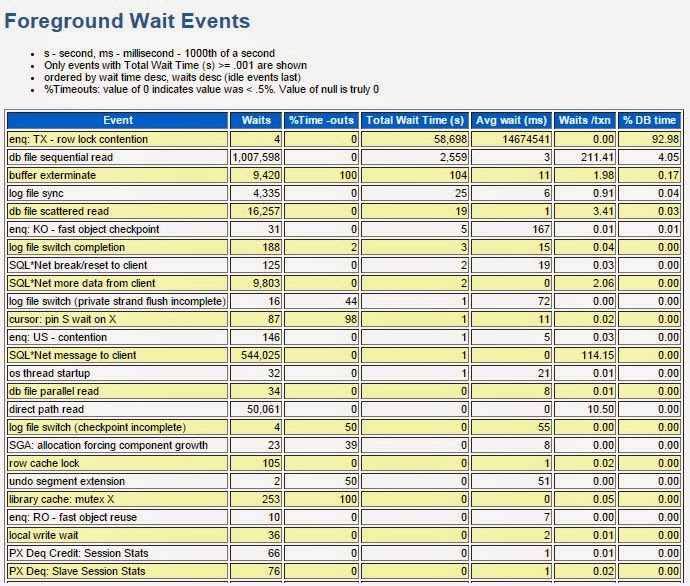
When investigating for locks in AWR, look for Foreground Wait Events => enq: TX - row lock contention.
Below is an example of Instance having many locking issues.